Free to set up and preview. Publish for £5.99 a month for your first 12 months.
Your nursery workspace
Your places. A clear route for families.Real Little Spaces screens. Example data.
A little more clarity
Less chasing for families.Clearer control for your nursery.
An extra morning or afternoon can mean several messages, a capacity check and a separate payment link. Little Spaces keeps available sessions, family requests, decisions and payments together, while your nursery decides what goes ahead.
Families see the places you can offer. Your nursery keeps control of availability and approval.
How it works
From a spare session to a booking,in three clear steps.
01
Publish the places you can offer
Add one-off or repeating nursery sessions. Choose the room or age group, times, capacity and price before families see anything.
A focused workspace for ad-hoc childcare availability, family requests and booking decisions.
01 · Availability
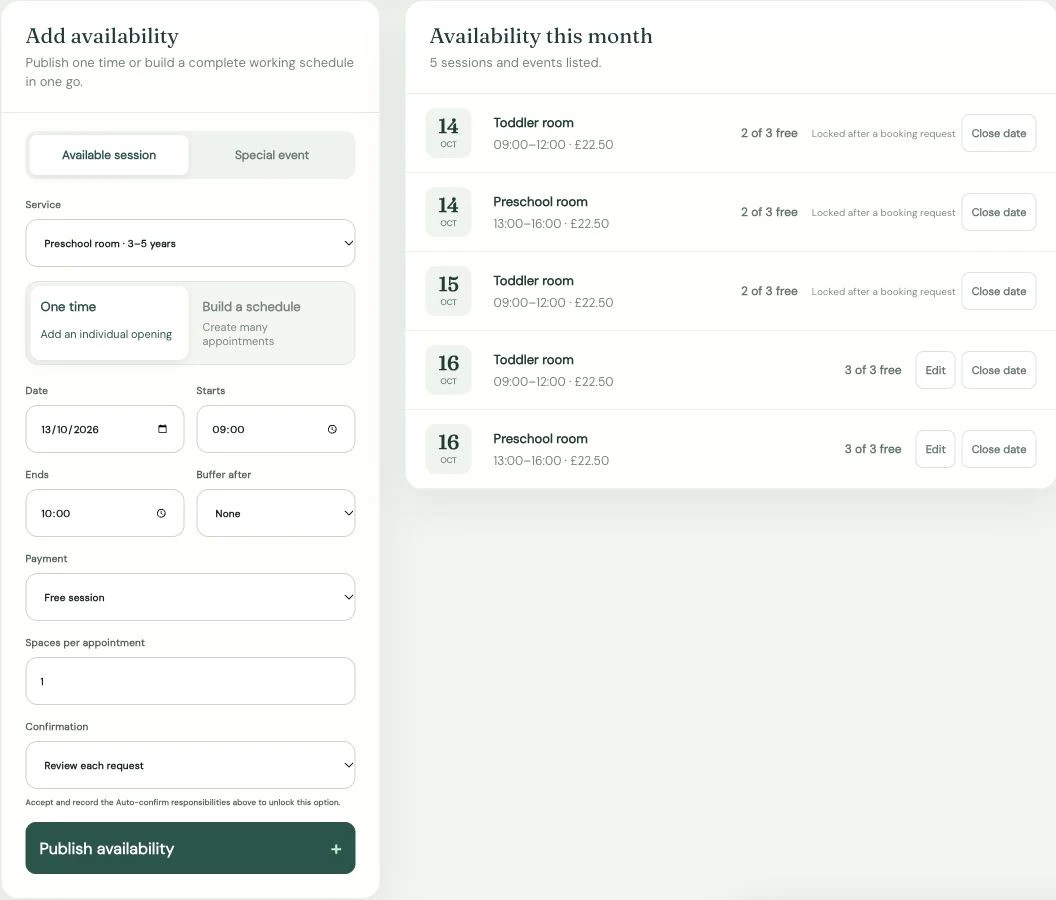
Make your available sessionsclear to families.
Publish the sessions your nursery can offer, with the right room or age group, times, capacity and price. Prepare one-off places or a repeating pattern, then preview the page before sharing it.
✓One-off and repeating nursery sessions
✓Rooms, age groups, times and capacity
✓Private preview before publication
Nursery availability in Little Spaces · example data
02 · Booking management
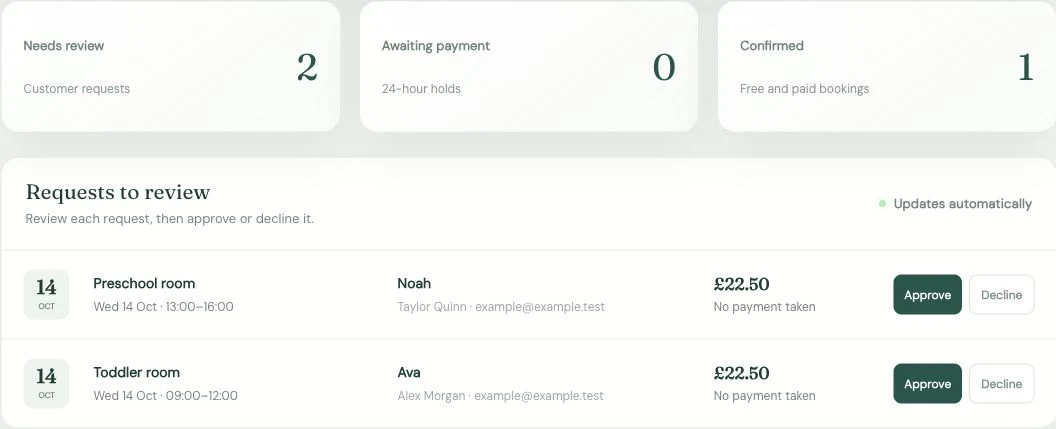
Review each family requestbefore saying yes.
See the child, parent or carer, session and payment status together. Use manual review to check whether the place can go ahead, then approve or decline it from the same workspace.
✓Nursery approval stays with your team
✓Clear request and payment statuses
✓Family updates and private booking links
Nursery request review in Little Spaces · example data
The next decision, clearly in view.
03 · Your families’ experience
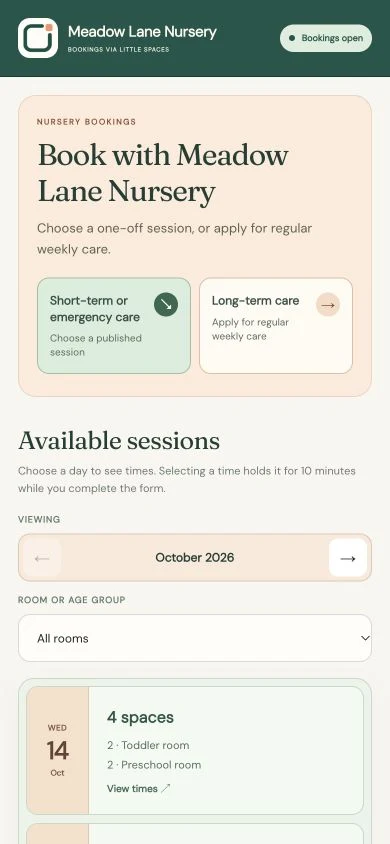
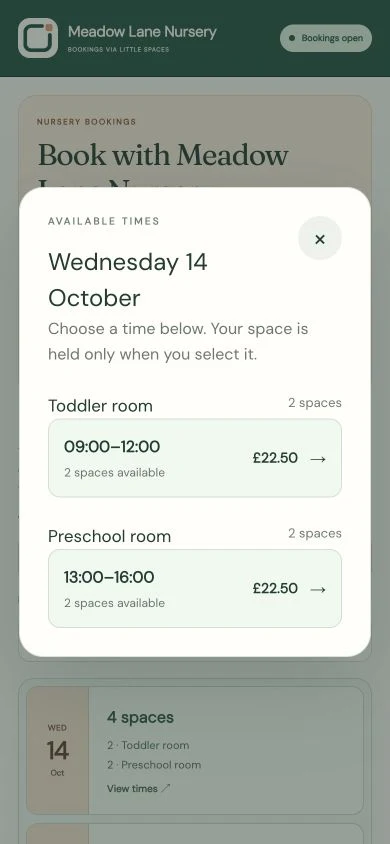
A clear booking journeyfor parents and carers.
Give families a page that feels part of your nursery. They can view available sessions, request a place and follow their booking through a private link, without creating an account.
✓Your nursery branding and logo
✓No parent or carer account required
✓Private links for booking status
✓Stripe-hosted online payment when enabled
From an available day to the right session · example data
Confidence in the small details
Simple on the outside.Carefully controlled underneath.
✓Build and preview privately before publishing
✓Parents and carers do not need an account
✓Booking status uses private links
✓Online payments use Stripe-hosted flows
✓Individual staff access for your nursery
✓Your sessions. Your approval decisions.
Also works for
Other businesses.The same thoughtful control.
Beyond childcare, Little Spaces also supports businesses offering limited time or places.
01
Workshops & group sessions
Offer a set number of places, then keep requests and confirmations together.
02
Wellbeing & appointments
Protect focused time while giving clients a simpler way to book.
03
Tutors & classes
Organise repeating sessions, group capacity and confirmations.
04
Limited services & events
Publish finite availability without presenting an always-open diary.
Founding customer offer
Start free.Publish when you’re ready.
Create and prepare your nursery workspace free. Your paid plan begins when you choose to publish your family booking page.
No Little Spaces fee on individual bookings.
Stripe’s own processing charges apply when online payments are used.
Available to the first 50 paying businesses. A free account does not reserve a founding place. Existing customers keep their agreed price.
Your 12-month price protection begins with the first successful subscription payment and continues while that subscription stays active. A payment recovered within the 7-day grace keeps it. If the subscription ends, the founding price is not guaranteed when rejoining. You will be told in advance before your founding period ends and before any later price change.
It gives nurseries a clear way to offer ad-hoc childcare places: publish available sessions, receive requests from families, review each request and collect payment where needed.
Do parents or carers need an account?+
No. Parents and carers can request a published childcare place without signing up, then follow the booking through their private status link.
Do I need an existing website?+
No. Your nursery gets its own branded booking page. Share it with families directly, or add the link to your existing website.
Can I review requests before accepting them?+
Yes. Use manual review to decide whether each request can go ahead. The nursery workflow shown here keeps approval with your team; publishing a session does not automatically approve a family’s request.
How do payments work?+
Offer free sessions, cash payment or online payment through Stripe when connected. Paid bookings need payment after approval. Booking payments go to your connected Stripe account, separately from your Little Spaces subscription.
When does the £5.99 subscription begin?+
Your nursery workspace is free to set up and preview. Start the monthly plan when you choose to publish your booking page.
Who qualifies for the founding price?+
The first 50 paying businesses qualify. The price is protected for 12 months from the first successful subscription payment while that subscription stays active. Recovery within the 7-day payment grace keeps that protection. If the subscription ends, the founding price is not guaranteed when rejoining. A free account does not reserve a place. Existing customers keep their agreed price and protection period.
What happens after the first 12 months?+
The later price has not been set. You will be told in advance before your founding period ends and before any price change takes effect, so you can decide whether to continue.
Does Little Spaces charge per booking?+
No. Little Spaces adds no fee to individual bookings. Stripe’s own processing charges apply when you use online payments.
Can I get help setting everything up?+
Yes. Set up at your own pace and email our support team whenever you need a hand. You do not need an onboarding call to get started.
A little space for what comes next
Make ad-hoc childcare simpler—for your nursery and its families.
Add your available sessions, preview the family booking journey and publish when your nursery is ready.